How does it work?
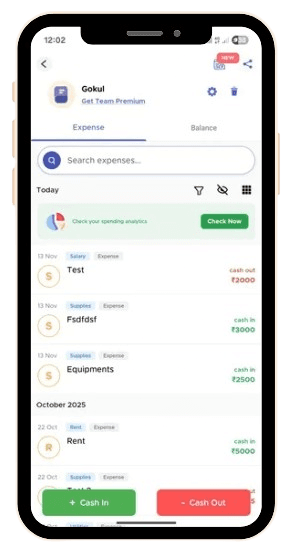
Step 1 — Create Your Business Group
Add partners or team members and set up your categories, payment modes, and workflows.
Step 2 — Record Cash Ins & Cash Outs
Track everything—sales collections, vendor payments, partner contributions, reimbursements, and more.
Each entry is tagged with mode of payment, category, and payer/receiver.
Step 3 — Log Everyday Expenses
Team members can add project expenses, bills, or reimbursement requests directly into the group.
Step 4 — See Balances & Business Health
Get a clear view of who owes what to the business or vice versa.
Use filters like Last Month or Custom Dates to analyze trends instantly.

Property Managers, PG Owners & Co-living Operators
Rent collections, food bills, utility payments, partner commissions with transparency.
Small Businesses & Startups
Track every rupee going in and out from vendor payments to monthly subscriptions— without any accounting software.

Track every rupee going in and out from vendor payments to monthly subscriptions— without any accounting software.
Small Businesses & Startups
Rent collections, food bills, utility payments, partner commissions with transparency.
Property Managers, PG Owners & Co-living Operators

Let employees upload expenses while owners/admins approve and settle them effortlessly.
Let employees upload expenses while owners/admins approve and settle them effortlessly.
Teams Handling Reimbursements
Teams Handling Reimbursements

Manage project-wise expenses, partner contributions, and payouts in a clean, shareable dashboard.
Manage project-wise expenses, partner contributions, and payouts in a clean, shareable dashboard.
Service Providers & Freelancers
Service Providers & Freelancers
Who is Business Groups for?
Who is Business Groups for?

Splitkaro
Business Groups.
Business expenses feel scattered? Bring your team, transactions, and settlements under one roof—fast, simple, and transparent.
Splitkaro
Business Groups.
Business expenses feel scattered? Bring your team, transactions, and settlements under one roof—fast, simple, and transparent.
How does it work?
Step 1 — Create Your Business Group
Add partners or team members and set up your categories, payment modes, and workflows.
Step 2 — Record Cash Ins & Cash Outs
Track everything—sales collections, vendor payments, partner contributions, reimbursements, and more.
Each entry is tagged with mode of payment, category, and payer/receiver.
Step 3 — Log Everyday Expenses
Team members can add project expenses, bills, or reimbursement requests directly into the group.
Step 4 — See Balances & Business Health
Get a clear view of who owes what to the business or vice versa.
Use filters like Last Month or Custom Dates to analyze trends instantly.
Step 1 — Create Your Business Group
Add partners or team members and set up your categories, payment modes, and workflows.
Step 2 — Record Cash Ins & Cash Outs
Track everything—sales collections, vendor payments, partner contributions, reimbursements, and more.
Each entry is tagged with mode of payment, category, and payer/receiver.
Step 3 — Log Everyday Expenses
Team members can add project expenses, bills, or reimbursement requests directly into the group.
Step 4 — See Balances & Business Health
Get a clear view of who owes what to the business or vice versa.
Use filters like Last Month or Custom Dates to analyze trends instantly.
Simple, transparent, and built for teams.
Frequently Asked Questions
Frequently Asked Questions
1. What is a Business Group in Splitkaro?
2. Who can use Business Groups?
3. Can my employees add expenses?
4. Do Business Groups support analytics?
5. What about recurring business bills?
6. Is this an accounting tool?
7. Will my team need Premium?
8. Can I export or share summaries?